# add a apt, tailscale list
curl -fsSL https://pkgs.tailscale.com/stable/ubuntu/jammy.noarmor.gpg \
| sudo tee /usr/share/keyrings/tailscale-archive-keyring.gpg >/dev/null
curl -fsSL https://pkgs.tailscale.com/stable/ubuntu/jammy.tailscale-keyring.list \
| sudo tee /etc/apt/sources.list.d/tailscale.list
# then install tailsale
sudo apt-get update
sudo apt-get install tailscale
# then start tailscale
ex) tailscale up \
--operator=$USER \
--accept-routes \
--advertise-exit-node \ # tailscale을 설정한 현재 device로 network traffic을 전송 하도록 설정
--advertise-routes=10.0.0.0/24,10.0.2.0/24,172.18.0.0/24,169.254.69.254/32 \ # tailscale을 설정한 device의 네트워크 대역을 tailnet 그룹에 전파 설정
--hostname=$HOSTNAME
--------------------------------------------------
sudo tailscale up

The easiest, most secure way to use WireGuard.
USAGE
  tailscale [flags] <subcommand> [command flags]

For help on subcommands, add --help after: "tailscale status --help".
This CLI is still under active development. Commands and flags will
change in the future.

SUBCOMMANDS
  up          Connect to Tailscale, logging in if needed
  down        Disconnect from Tailscale
  set         Change specified preferences
  login       Log in to a Tailscale account
  logout      Disconnect from Tailscale and expire current node key
  switch      Switches to a different Tailscale account
  configure   [ALPHA] Configure the host to enable more Tailscale features
  netcheck    Print an analysis of local network conditions
  ip          Show Tailscale IP addresses
  status      Show state of tailscaled and its connections
  ping        Ping a host at the Tailscale layer, see how it routed
  nc          Connect to a port on a host, connected to stdin/stdout
  ssh         SSH to a Tailscale machine
  funnel      Serve content and local servers on the internet
  serve       Serve content and local servers on your tailnet
  version     Print Tailscale version
  web         Run a web server for controlling Tailscale
  file        Send or receive files
  bugreport   Print a shareable identifier to help diagnose issues
  cert        Get TLS certs
  lock        Manage tailnet lock
  licenses    Get open source license information
  exit-node   Show machines on your tailnet configured as exit nodes
  update      Update Tailscale to the latest/different version
  whois       Show the machine and user associated with a Tailscale IP (v4 or v6)
  drive       Share a directory with your tailnet
  completion  Shell tab-completion scripts

FLAGS
  --socket value
        path to tailscaled socket (default /var/run/tailscale/tailscaled.sock)
# tail lock 설정
# tail sign 설정
Add signing node
To add signing devices for your network, you can use the use the Tailscale CLI. Run the following command on the new device you'd like to add.
sudo tailscale lock status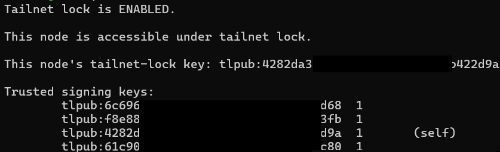
Copy the tailnet lock key, which begins with tlpub:
Then, from an existing signing device, run the following command.
sudo tailscale lock add
After which, the first device will be marked as a signing device.
sudo tailscale lock add <copied-key>
'IT' 카테고리의 다른 글
| Crontab 에서 $RANDOM 활용을 위한 대안 (0) | 2024.05.26 |
|---|---|
| Configuring Linux DNS (0) | 2024.05.15 |
| old snap revision delete (0) | 2024.05.15 |
| xauth 설정 및 x11 접속 (0) | 2024.05.15 |
| Docker setting (0) | 2023.02.12 |